Every property lead. Every follow-up. One clear view.
Manage property enquiries, organize your sales pipeline and bring your team’s follow-ups into one centralized workspace. Designed for brokers, channel partners, agencies and developer sales teams.
Book a Product Demo ↗Explore Features ↓Lead Management • Team Assignment • Follow-up Tracking • Sales Visibility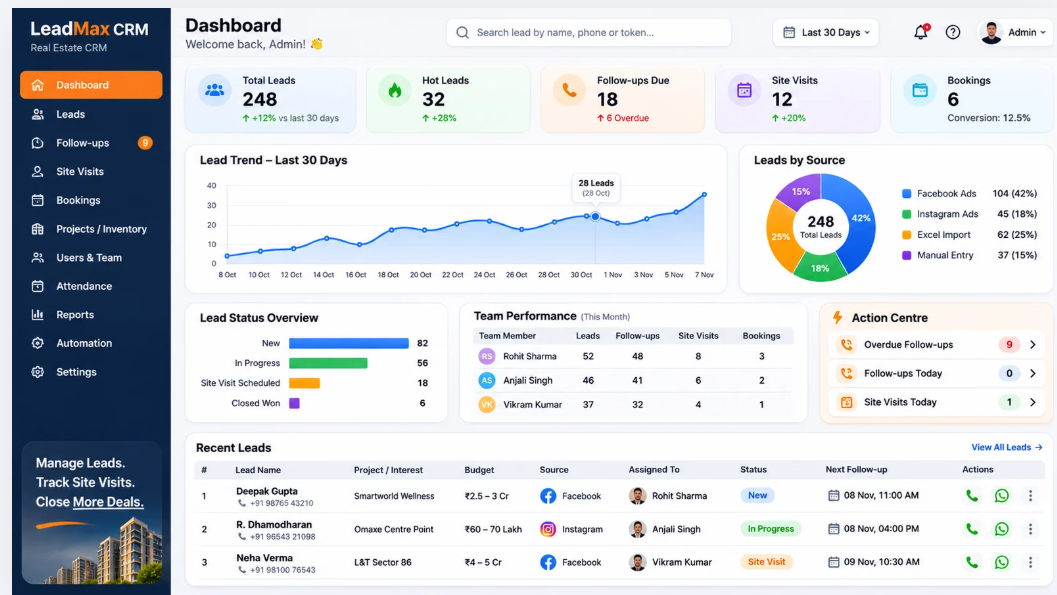
Everything your real estate sales team needs to stay organized.
Keep lead information, team activity and customer conversations connected throughout the sales journey.
Centralized Lead Management
Capture and organize property enquiries in one place. Maintain lead details, requirements, source and current status.
Lead Assignment & Routing
Assign enquiries to the right salesperson or team and create a clearer ownership process.
Follow-up Reminders
Plan the next call or action, record activity and help your team stay consistent with prospects.
Sales Pipeline Tracking
Track prospects across new enquiry, contacted, qualified, site visit, negotiation and booking stages.
Team & User Management
Manage employee access and lead ownership with role-based workflows for your sales structure.
Reports & Performance Insights
Review lead activity, follow-up progress and team performance to identify delays and opportunities.
Project & Property Records
Keep project and property information organized for salespeople while speaking with prospects.
Call & Communication History
Maintain useful records of customer interactions and notes for smoother team handovers.
Lead Source Visibility
Understand where enquiries originate, such as campaigns, website forms, referrals or portals, where configured.
Move enquiries from first contact to site visit with more clarity.
Keep your pre-sales process structured. Track prospects, understand requirements, schedule the next interaction and help salespeople focus on the right opportunities.
- Lead capture and centralized enquiry records
- Lead allocation to salespeople
- Follow-up scheduling and reminders
- Call notes and interaction history
- Prospect status and pipeline visibility
- Site visit coordination and tracking
Pre-sales workflow
A simple view of the journey from enquiry to a qualified opportunity.
Team collaboration
Coordinate internal sales teams and external partners through a more transparent process, based on the modules enabled for your business.
Build stronger coordination with your broker network.
Organize channel partner information and coordinate enquiries, updates and sales activity.
- Channel partner records and contact details
- Lead and enquiry coordination
- Partner-wise activity visibility
- Communication and follow-up tracking
- Partner performance review
Keep customer and booking follow-through organized.
Continue the customer journey beyond negotiation with structured records and clear next actions for the relevant team.
- Customer and booking information
- Task and activity tracking
- Document and communication records
- Payment follow-up visibility, where configured
- Post-sales coordination and status updates
Customer journey
Keep important milestones visible to the teams responsible for customer coordination.
Connect lead generation with your sales workflow.
Bring campaign enquiries into an organized process. Available connections depend on integrations configured for your account.
Meta Lead Ads
Connect Facebook and Instagram lead forms to your CRM workflow, subject to account permissions and integration setup.
Google Ads Enquiries
Route website and landing page enquiries generated from Google campaigns into your lead management process.
Website & Landing Pages
Capture enquiries from website forms and campaign landing pages through configured integrations.
Calls & Follow-ups
Keep call activity, notes and next steps visible to responsible team members.
Email Communication
Support customer communication records and email workflows where enabled.
WhatsApp Workflows
Support WhatsApp-based communication through the applicable connected service and approved setup.
A practical CRM workspace for different real estate businesses.
Adapt the CRM workflow to the way your organization handles property enquiries and sales activity.
Real Estate Brokers
Keep client requirements, property enquiries and follow-up activity organized across your team.
Channel Partners
Coordinate enquiry ownership, team communication and sales progress across partner networks.
Developer Sales Teams
Track project enquiries, prospect progress, site visits and customer follow-through.
Ready to bring your real estate leads into one place?
Book a walkthrough and explore how the CRM can fit your sales process.
Frequently asked questions
What is a real estate CRM?
A real estate CRM organizes property enquiries, customer information, sales activity and follow-ups through a centralized workflow.
Can I manage leads from different marketing sources?
Lead capture can be connected to supported sources such as website forms, advertising lead forms and other channels, depending on integrations configured for your account.
Can I assign leads to my sales employees?
Lead assignment workflows help allocate enquiries to the responsible salesperson or team and maintain visibility into lead ownership.
Can the CRM track follow-ups and site visits?
Follow-up activity and site visit stages can be recorded as part of the sales pipeline, helping teams understand the next action for each prospect.
Is the CRM suitable for brokers and property developers?
The workflow can support brokers, channel partners and developer sales teams. The exact setup should match your business process and required modules.
Can the CRM be customized?
Customization options depend on the requirements and scope agreed for your deployment. Contact Digital Vertex to discuss your workflow.